
Describe it AI builds it
For business owners and builders - build your web business: the site, the store, the ads, or a tool that makes them for you. Every top AI in one account, and you own the code.
FreeBring your own Claude, ChatGPT or OpenRouter key and pay us nothing. See how
No AI plan? Ours is free every week. Your idea is saved while you sign in.
Use the browser or choose an app.
Free with the AI you already pay for
Plug in your own Claude, ChatGPT or OpenRouter key and build as much as you like. We charge you nothing for it.
Bring your own AI
- Claude, ChatGPT or GeminiThe plan you have
- OpenRouterYour own key
- Ollama, on your own computerWorks offline
$0 to us, with no limit from us
No AI plan? Use ours
- Every text, image and video model33 models
- Free usageRefills every week
- Build in your browser or on your phoneNothing to install
$0 every week, no card
Your own AI works in the Mac and Windows apps. Images and video use our models, with free usage every week.
Used ChatGPT? Now set up the real thing
Pick what you do. We start the first version for you, and you change it by asking.
- I run a shop or salonOnline booking with a deposit at checkoutStart this
- I'm a coachA site that sells your sessions and takes paymentStart this
- I give advice for a livingA page where new clients book and pay for a first callStart this
- I have a restaurant or cafeYour menu online, with orders for pickupStart this
- I sell productsA store page with Stripe checkoutStart this
- I want an app for my businessA simple app for your customers or your teamStart this
What you get that others don't
- Already pay for Claude or ChatGPT?The Mac app runs on the plan you already have, at no extra cost. No second AI bill.See the Mac app
- Every top AI, one account33 models for text, images and video. One login instead of five subscriptions.See the models
- Live on the web for $5Put up to 10 sites online with Starter. No hosting to set up.See plans
- Templates and playbooksStart from a ready-made site for your business, or pick one of 27 tested moves like a shorter checkout.Browse playbooks
- It reads your project firstConnect a GitHub project and it learns your files and what they run on, so every change fits.Start building
- 60 tools plug right inStripe, Shopify, Supabase and more. Add a key once and it tells you what's ready and what's missing.See the tools
One prompt, a working app
Each one below was made from the words under it. Copy them, swap in your business, and build yours.
-
 Open it
Run your team
Open it
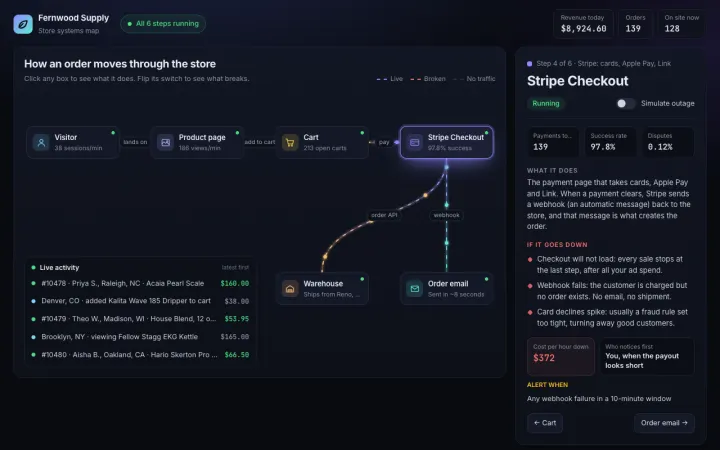
Run your teamClickable map of how your app works
Make an interactive flowchart of how my online store works: visitor, product page, cart, Stripe checkout, order email, warehouse. Click any box to see what it does and what breaks if it goes down. Dark theme, smooth animated lines.
-
 Open it
Get customers
Open it
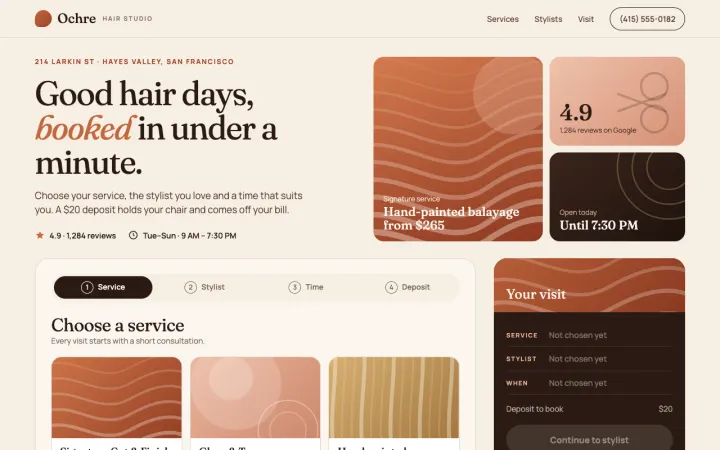
Get customersBooking page for a salon
A booking page for my hair salon. Pick a service, a stylist and an open time slot, then pay a $20 deposit. Warm, premium look with big photos-style color blocks. Works great on a phone.
-
 Open it
Get customers
Open it
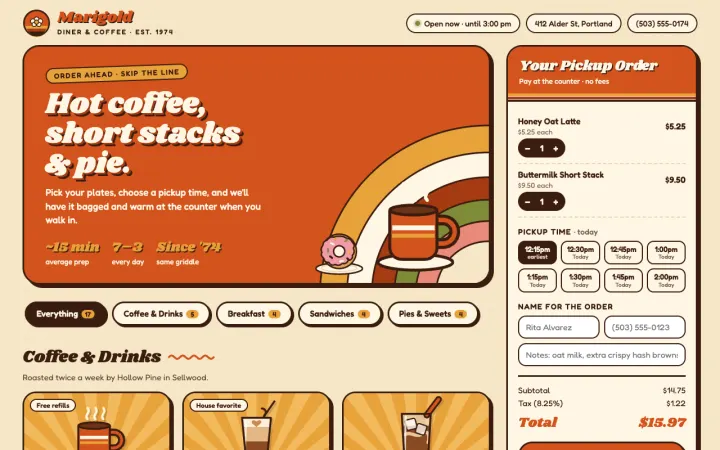
Get customersCafe menu with pickup orders
An online menu for my cafe with categories, item photos as colorful illustrations, and an order-for-pickup cart that shows the total and a pickup time. 70s diner style: cream, burnt orange, rounded type.
-
 Open it
Launch something
Open it
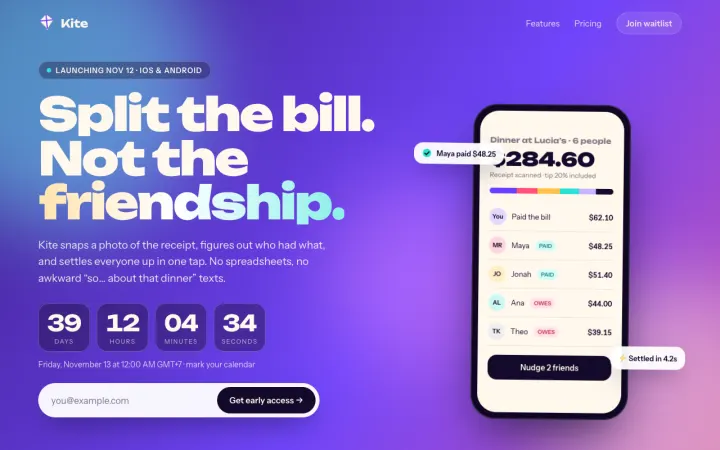
Launch somethingLaunch page with a countdown
A launch page for my new app with a big bold headline, a live countdown to launch day, three feature cards and an email signup. Make it feel exciting: gradient background, subtle motion.
-
 Open it
Run your team
Open it
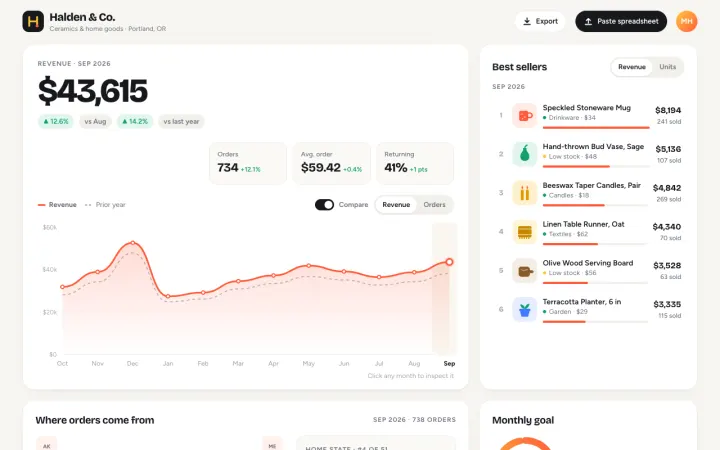
Run your teamSales dashboard from a spreadsheet
Build a sales dashboard for a small shop: revenue this month, best sellers, a 12-month line chart and a map of where orders come from. Use realistic sample numbers I can swap for my spreadsheet later. Clean and bright.
-
 Open it
Make videos and posts
Open it
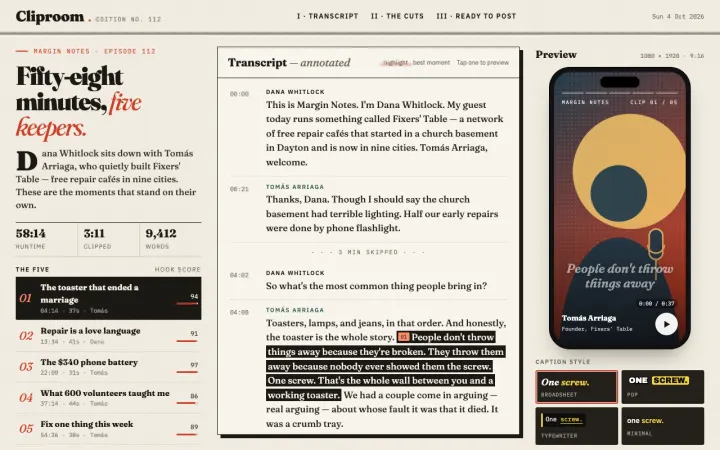
Make videos and postsPodcast to short clips
Turn my podcast episode into 5 short clips: show the transcript with the best moments highlighted, a waveform per clip, a caption style picker with a phone-sized preview, and a list ready to post. Magazine look, serif headlines.
Stop renting your business tools
Most small businesses pay a monthly fee for every tool they run on. Build yours once, keep it, and change it whenever you want.
Renting a tool for each job
- WebsiteSquarespace$19/mo
- Link-in-bio storeStan Store$25/mo
- Bookings and invoicesHoneyBook$29/mo
$876 a year, every year
Building your own with MightyMouse
- Building your site, store and booking pageFree
- Live on the web, up to 10 sites$50 a year
- The codeYours to keep
$0 to build, $50 a year to go live
Starting prices from each tool's pricing page, October 2026. Card fees apply either way.
- Yours to keepSave the code to your GitHub or keep it on your Mac, and take it anywhere.
- Works your wayChange any page, button or step by asking. No template limits, no upgrade to unlock a feature.
- Set up in minutesStripe, Shopify, Supabase and 60 more plug in with a key. It tells you what's ready and what's missing.
See it work
Or make it from your iPhone
Works with 33 top AI models and 60 tools your app runs on
- Seedance 2.5
- Opus 5.5
- GPT-6 Astra
- Gemini 3.1 Pro
- Runway Gen-4.5
- Veo 3.1
- Sora 2 Pro
- Kling 3.0 Pro
- Nano Banana Pro
- FLUX.2 Max
- Grok 4.7
- DeepSeek V4 Pro
- Recraft V4.1 Pro
- MiniMax Hailuo 3 Max
- Stripe
- Shopify
- Cloudflare
- Supabase
- Vercel
- GitHub
- PayPal
- Firebase
- Resend
- Slack
- Notion
- AWS
- Netlify
- Twilio
- PostHog
- Square
- MongoDB
- Discord
Every top AI and every tool your app needs
Make the ad with Runway. Take payments with Stripe. Sell on Shopify. Put it live on Cloudflare. All from one account.
Write and code 10
Pick the best brain for the job.
- Opus 5.5
- Sonnet 5
- Fable 5.1
- GPT-6 Astra
- Gemini 3.1 Pro
- GLM 5.3
- DeepSeek V4 Pro
- Kimi K3
- Qwen 3.8 Max
- Grok 4.7
Make images 12
Logos, product shots, ads.
- GPT Image 2.5
- GPT Image 2.5 Sunburst
- Nano Banana Pro
- FLUX.2 Max
- Seedream 5.0 Pro
- MAI Image 2.6
- Grok Imagine 2.0
- Qwen Image 3 Pro
- Recraft V4.1 Pro
- Krea 2
- Meta Muse
- Nano Banana 2
Make video 11
Ads, demos, clips. From a sentence.
- Seedance 2.5
- Gemini Omni Flash
- Veo 3.1
- Sora 2 Pro
- Kling 3.0 Pro
- Runway Gen-4.5
- MiniMax Hailuo 3 Max
- Grok Imagine Video
- Wan 3.0 Prime
- FLUX 3 Video
- Veo 3.1 Fast
Hook up 60 tools your app runs on
Add a key once. MightyMouse checks your project and tells you what is ready and what is still missing.
Get paid
- Stripe
- Shopify
- PayPal
- Square
- RevenueCat
Put it live
- Cloudflare
- Vercel
- Supabase
- AWS
- DigitalOcean
- Firebase
- Fly.io
- Google Cloud
- Netlify
- Railway
- Render
Store your data
- Postgres
- MongoDB
- Redis
- PlanetScale
- Airtable
- Notion
Send email
- Resend
- SendGrid
- Mailgun
- Brevo
- Mailchimp
- Postmark
- beehiiv
- Zoho
Message people
- Slack
- Discord
- Telegram
- Twilio
Ship code
- GitHub
- Apple
- GitLab
- Docker Hub
- npm
- Sentry
- Zapier
- Make
- Linear
- Nango
- Cloudflare Turnstile
Measure it
- Amplitude
- Microsoft Clarity
- Datadog
- Google Analytics
- Mixpanel
- PostHog
- Meta Ads
Post it
- PostSyncer
- HubSpot
- TikTok
- X
- YouTube
Every model, every plan
Free every week, and no limit from us when you bring your own AI. Put a site online from $5 a month, or choose more usage.
Free
$0
Free usage that refills every week.
- No limit with your own Claude or ChatGPT
- Every text, image and video model
- Build in your browser or on your phone
- No card needed
Starter
$5/mo
A live site, plus extra usage each month.
- Everything in Free
- Put up to 10 sites online
- 1.5x the usage of Free
Pro
$20/mo
6x the usage of Free, every month.
- Everything in Starter
- 4x the usage of Starter
- Add extra usage any time
Max
$60/mo
3x the usage of Pro, every month.
- Everything in Pro
- 18x the usage of Free
- Add extra usage any time
Usage works across text, image and video models, and the app shows what you have left. Paid plans renew monthly. Cancel any time in your account. Compare plans.
How MightyMouse compares
One account does what usually takes four: chat with every top AI, make the images and video, and build your business online.
| MightyMouse | ChatGPT | Claude | Cursor | Bolt | OpenRouter | |
|---|---|---|---|---|---|---|
| Text AI | Claude, GPT, Gemini, Grok, DeepSeek and more | OpenAI only | Claude only | Claude, GPT, Gemini, Grok | - | Every major model, by API |
| Images and video | 23 models: Veo, Sora, Kling, FLUX and more | OpenAI only | - | - | Image editing | Image models, by API |
| Builds your site and puts it online | Yes, from one sentence | - | - | You write the code | Yes | For developers to build on |
| Uses the Claude or ChatGPT plan you have | Yes, free, on Mac and Windows | Its own plan | Its own plan | - | - | Your own API keys |
| Free plan | Refills every week, no limit with your own AI | Yes, limited | Yes, chat | Yes, limited | Yes, daily limit | 50 requests a day |
| Paid plans from | $5/mo | $8/mo | $20/mo | $20/mo | $25/mo | Pay as you go |
Pick DeepSeek and your usage lasts up to 10x longer. Other prices are each company's monthly price, checked 4 October 2026.
Got a Mac?
Drop your email and the download link is waiting when you sit down at your computer.
Your phone turns into your Mac, and your voice types into any app. See what it does on a Mac
Common questions
Is MightyMouse free?
Yes. Bring your own Claude, ChatGPT or OpenRouter key to the Mac or Windows app and we charge you nothing, with no limit from us. No AI plan? Free comes with usage that refills every week, no card needed. Put a site online with Starter for $5/mo. Pro is $20/mo and Max is $60/mo for more usage. Every plan includes every model.
Do I need to know how to code?
No. Describe what you want and MightyMouse builds it. No Mac needed either - it builds in the cloud.
Which AI models can I use?
33 top models, in one account: Claude, GPT, Gemini, Grok, DeepSeek and more for text, Nano Banana, FLUX and GPT Image for pictures, and Runway, Veo, Sora and Kling for video. On the Mac, you can also use the Claude or Codex plan you already pay for.
How is MightyMouse different from Cursor, Bolt or OpenRouter?
MightyMouse puts every top AI for text, images and video in one account, builds your web business from one sentence - the site, the store, the booking page - and puts it online from $5 a month. Cursor is a code editor for programmers, OpenRouter is an API for developers, and Bolt builds sites. MightyMouse also makes the logo, the product photos and the launch video in the same place.
Where can I use MightyMouse?
Use the web app, or download the macOS, Windows or iPhone and iPad app from the platform choices above. Linux currently uses the web app; no native installer is published. There is no native Android app.
What if I don't have an AI subscription?
It still works. Sign in and use the built in option, no card needed and nothing to set up. Voice transcription is free either way because it runs on your Mac, not the cloud.
Is MightyMouse related to the Apple Mighty Mouse?
No. Apple's Mighty Mouse was a hardware mouse discontinued in 2009. MightyMouse is an AI app for Mac and Windows, built by Techguyver Labs.